
When you go out to work, school or the gym tomorrow, how much is all that stuff you’re carrying worth?

If I suggested it’s typically more than £500, would that surprise you?

What does losing £500, with no chance of getting it back, even feel like?

But it’s not £500. It’s often much more than that.

Here’s my unscientific but I think pretty conservative breakdown. Your mileage may vary, but I don’t think it’s far off the mark.

Wallet / purse & contents – £60

House keys – £30

Car remote key – £80

Spectacles – £150

Sunglasses – £60

Smartphone – £400

And the grand total is………… £780

If you’re tuning in from the USA, that’s USD $1256 at today’s exchange rate of 1.61.

Oh, I’ve deliberately assumed that you’ve left your other portable devices at home, namely your £500 ($805) tablet and your £100 ($161) Kindle. Not to mention any chargers, cosmetics, etc. in that bulging bag or backpack.

Include those too, and soon you’re talking REAL money!

I’ve also stuck to estimating the financial loss, not data loss, and not the personal impact on your life.

Yes, I seem to be making a pretty good case for getting yourself some great insurance. But you’ll pay a small fortune to insure all this gear. Insuring a recent-model iPhone or Android phone in the UK costs around £6 per month. £72 ($116) per year. For just ONE device!

At WhosMyOwner.com our mission is to convincing you that insurance payouts aren’t the best outcome, and they’re no longer the only option for protecting your stuff.

Why not register and take a free trial now, and see out for yourself how much peace of mind the price of a pizza can buy.
Creating your own labels?

Great!  That’s what’s unique about WhosMyOwner and why it can be used to protect virtually anything.

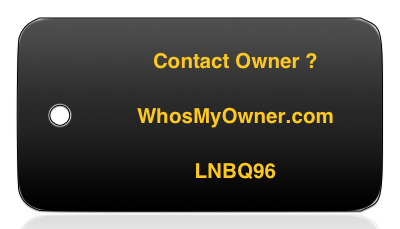
The only two necessary bits of information you must include for Finder Reports to work are illustrated here:

Without those two pieces of information, the finder cannot notify you about your item.
1. Our web address.

Our official web URL is https://whosmyowner.com

You can freely capitalise our domain name, and leave off the HTTP without confusing anyone.

For instance, WhosMyOwner.com, WHOSMYOWNER.COM and https://whosmyowner.com are all fine.

2. Your WhosMyOwner tag.

You tag is a unique series of six uppercase letters and digits, for instance LNBQ96

So for instance, you could print or write the following:

If you find this, please visit WhosMyOwner.com and enter code LNBQ96

You can also combine our web address with your tag like this:

To contact owner, please visit http://WhosMyOwner.com/AD3MO

Losing your data-laden phone or tablet is a horrific experience.

Google, Apple and Microsoft all provide ways of finding your lost mobile device, and/or remotely locking or wiping its data. We highly recommend turning this feature on, whatever device you have. See below for links.

Bear in mind that, wiping your device is a last resort: you almost certainly won’t get it back after a wipe, because the information you’ve deleted can’t now be used to return your device.

That’s where WhosMyOwner steps in.

We provide two simple ways for you to tag your device, and we strongly recommend using them both.

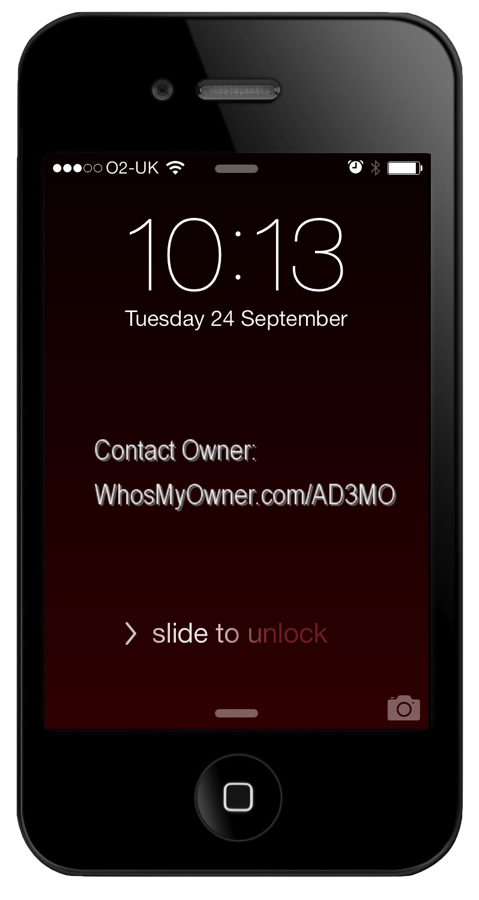
First, use our Secure Smartphone Wallpaper to create a lock-screen image showing your WhosMyOwner tag. Quick, simple and easy to install, this is the first thing anyone finding your phone and switching it on will see. Chances are they’ll get in touch before you even realised you’ve left your device somewhere.

Second, we recommend attaching a WhosMyOwner tag to your device or its case. This will help get your device back even if you’ve wiped it.

It’s up to you how to label your stuff. Lots of people are downloading our pre-formatted, personalised tags, printing them on plain paper or Avery label sheets, and attaching them to the back of their device or its case. It won’t spoil the look if it’s on the back.

Simple is best – most people have plain paper and clear tape.

Here are the vendor-specific links to popular free services for finding your lost mobile:

Google: https://www.google.com/android/devicemanager

Apple: http://www.apple.com/icloud/find-my-iphone.html

Microsoft: https://www.windowsphone.com/my

wmo-tagged-iphone-s

Customers can choose this or any other security wallpaper, download it free, and and install it in seconds.

WhosMyOwner users can now download free security lock-screen wallpaper to protect their mobile devices.

To get your customised wallpaper, log into WhosMyOwner, choose Labels, then in the Smartphone Wallpaper section, choose the design you want.  Open and save the resulting image as your device’s lock screen wallpaper. 

Voila!  Your mobile device now has your WhosMyOwner tag right out in front, where a finder can see it instantly.

If you’d hate to lose your smart phone, this is definitely a must-have!

[twitter_follow_button]

Yes!  In fact as a member you already have one.

Log into your account and choose the Labels tab.

There you’ll see a QR code we’ve created specially for your tag.

You can copy the image straight from the page (e.g. right click menu on a PC, Ctrl-click on a Mac) and copy/paste it into your own documents.

Scanning your QR code will open the following URL:

http://WhosMyOwner.com/YOUR-TAG

Where people can leave you a Finder Report.

You can also download and print labels with your QR code already on them.  Just visit the Labels page and choose one of the links for pre-formatted labels in popular Avery layouts.  If you don’t see the size you need, send us the Avery product code you need using the Contact Us page, and we’ll try to add it to our supported list.

We firmly believe that most people are not only honest but actually want to help you out if you’ve lost something of value.

This story (link below) proves the point beyond any doubt, and if anyone knows how to get hold of whoever lost this bag of cash, please tell them about WhosMyOwner.com

http://www.bbc.co.uk/news/world-us-canada-24170670

Every year, over 4000 things are lost and found during the Oktoberfest. The all-time classics are glasses, phones, money, jackets, pullovers and at least one set of dentures.

Full article, and details of their Lost + Found procedures after the jump:

http://www.oktoberfest.de/en/article/About+the+Oktoberfest/About+the+Oktoberfest/Lost+and+Found/799/

Looks like they’re quite organised, but don’t leave it to chance! Put WhosMyOwner labels on all your stuff at big festival events, and you’ll be much more likely to get it back if you lose it. And quickly, so you can enjoy the event and stop worrying about it!

(sigh) A health warning may be needed here for some (you know who you are):

Don’t put sticky labels on your dentures – they taste awful. (The labels, not the dentures.)